
Create a Wallet
Understand what a new wallet creates and why recovery material must be protected before receiving assets.
Learn more →MULTI-CHAIN WALLET · WEB3 KNOWLEDGE · SECURITY
A multi-chain wallet, blockchain network and Web3 knowledge hub from imtoken
Use imtoken to understand multi-chain assets, choose the correct network, send and receive assets, inspect transaction records, connect to DApps, review approvals and build safer wallet habits. Each action should begin with checking the address, network and request details.
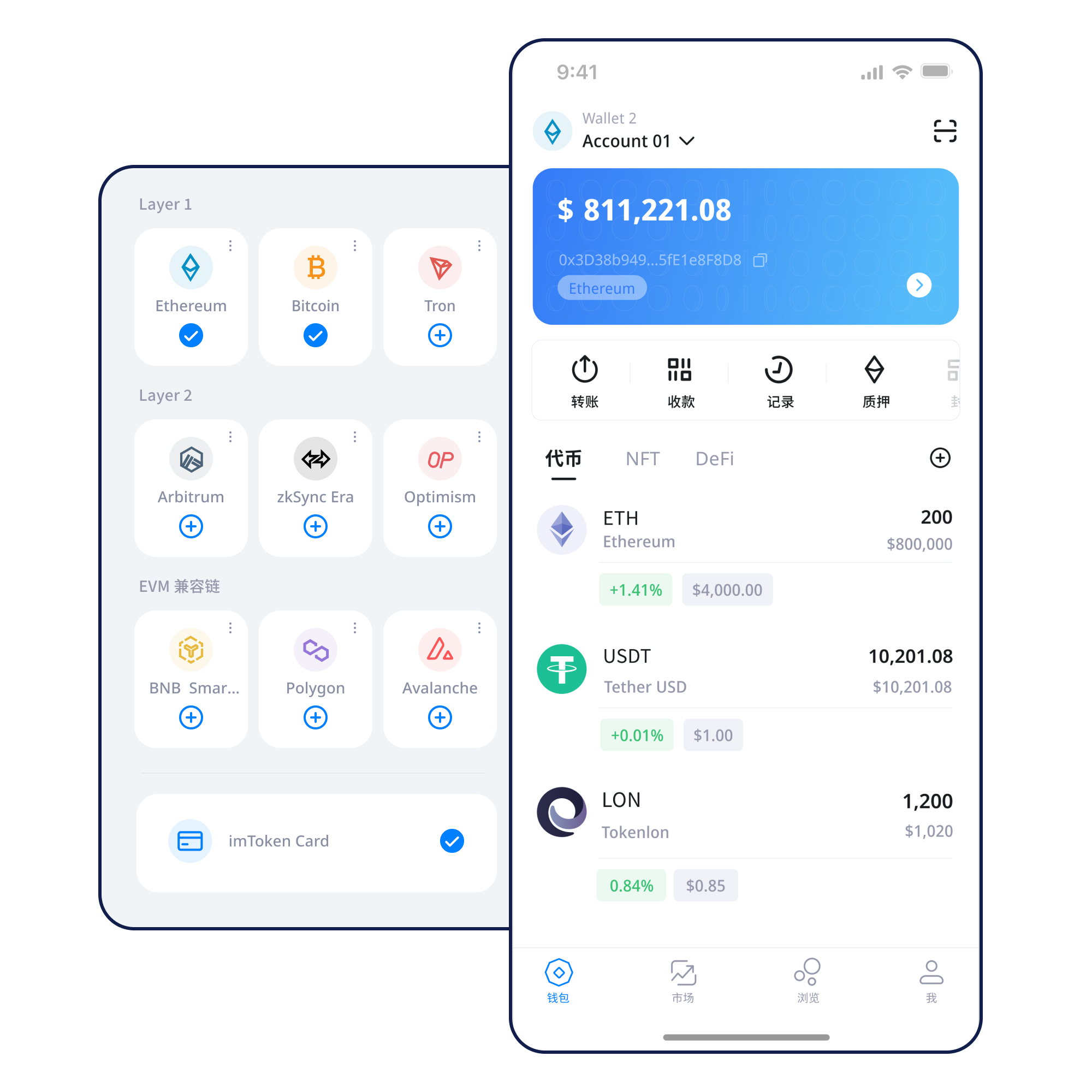
Understand what a new wallet creates and why recovery material must be protected before receiving assets.
Learn more →Record recovery material offline, verify it carefully and keep it away from screenshots or shared cloud folders.
Learn more →Match the receiving address with the selected network and confirm the asset contract when needed.
Learn more →Check the address, network, amount and gas before confirming an on-chain transfer.
Learn more →Verify the site domain, account request, signature meaning and approval scope before accepting.
Learn more →WALLET CAPABILITIES
Networks may use similar address formats while having different gas assets, confirmation rules and token contracts. Select the intended network first, then compare the address and asset details.
 Understand multi-chain networks →
A transfer involves the receiving address, network, amount, gas and a transaction hash after submission.
Follow the transfer checklist →Review assets, manage networks, inspect transaction records and approach DApp requests from a mobile wallet workflow.
Explore the app workflow →Browser connections should keep the user in control of account access, signatures, approvals and disconnection.
Understand browser connections →Keep seed phrases and private keys under your own control, prefer offline backup and regularly review unnecessary approvals.
 Open the security center →
BLOCKCHAIN NETWORKS
A wallet can display assets across several networks, but each network has its own state, fees and confirmation process. Always select the intended chain before receiving or sending.
Read the guide →Nodes propagate transactions, blocks organize them and confirmations increase as new blocks build on the transaction history. Explorers help verify what the network recorded.
Read the guide →
EVM networks commonly use compatible account formats and smart-contract logic, yet token contracts, chain identifiers and gas conditions still differ by network.
Read the guide →
Layer 2 systems process activity with a relationship to a base layer. Moving assets between layers may involve bridges, separate confirmation stages and waiting periods.
Read the guide →
Gas conditions change with network demand. A submitted transaction receives a hash that can be checked in a suitable block explorer while confirmations accumulate.
Read the guide →A PRACTICAL PATH
Use the download entry, then confirm you are operating within the expected product context before proceeding.
Understand whether you are creating a new wallet or restoring one and never expose recovery material to a webpage.
Record the seed phrase offline, protect the private key and avoid screenshots or sharing through chat.
Match the destination network with the address and asset before making a transfer.
Confirm the amount and gas, then keep the transaction hash for status checks.
Inspect transaction history and remove DApp approvals that are no longer needed.
WEB3 & DAPP
Connecting a wallet does not mean every later request should be accepted. Verify the DApp domain, requested account access, signature text, transaction details and approval scope each time.
Open the Web3 guide →SECURITY FIRST
A wallet cannot make third-party websites, contracts or networks risk-free. Keep seed phrases and private keys under your own control, use offline backup, verify every transfer, read signatures before accepting and review approvals over time. Public devices, public Wi-Fi and remote-control tools add extra exposure and should be used cautiously.
Enter the security center →ACADEMY
Start with the relationship among an address, seed phrase and private key. Then learn why networks matter, what gas pays for, how a transaction hash helps you inspect status, and why DApp connections and token approvals deserve separate checks. This order makes later operations easier to reason about instead of turning wallet use into a sequence of unexplained buttons.
Start the beginner guide →Why nodes, blocks and confirmations matter to transaction status.
Read →Understand accounts, gas, contracts and token approvals.
Read →Learn base-layer relationships, bridging and confirmation stages.
Read →Separate connections, signatures and token permissions.
Read →Build repeatable checks around recovery material and transactions.
Read →Review key terms in plain language.
Read →ETHEREUM · POS
Ethereum proof of stake uses validators to participate in consensus. Rewards can come from protocol activity, while validator status, withdrawal mechanics and exit queues affect when assets or rewards become available. Staking does not guarantee returns, and rewards can change.
Read the staking guide →BEFORE PARTICIPATING
Validator penalties, smart-contract risk, exit waiting times, market volatility and third-party service risk should be considered independently. Participation should be based on personal circumstances rather than fixed-yield expectations.
Understand PoS and validators →UPDATES
Review wallet creation, backup and transaction-record workflows.
Check the intended chain and gas asset before sending or receiving.
Inspect the approval target, permission scope and whether an old approval is still needed.
Use the support center for product guidance without sharing recovery credentials.
FAQ
You do. Keep them under your own control and never send them to support staff, websites, chat contacts or anyone else.
The same-looking address can appear across compatible networks while the ledger, gas asset and token contract differ. Confirm the network explicitly.
Generally no. Once accepted by the network, a wallet normally cannot unilaterally reverse it. Verify the destination before submission.
It identifies a submitted transaction and can be used with a suitable block explorer to inspect its network status.
No. Treat each signature, transaction and approval as a separate decision and inspect it independently.
Review the requesting contract or DApp, permission scope, token and amount, and whether the access is actually needed.
Use the download entry when you are ready, or continue through the academy and security guides before making on-chain transactions, signatures or approvals.
Download imtoken